
This section demonstrates how Virtual Keypad allows customers to maintain awareness of their security environment, manage system status, respond to events, and remotely oversee daily security operations from a unified platform.
The goal is not simply to arm and disarm a system.
The goal is to provide customers with operational awareness, event visibility, alarm response capabilities, and connected security workflows that help them stay informed and take action from virtually anywhere.
This section establishes the foundation for how intrusion, notifications, video, access control, and automation work together inside Virtual Keypad to create a connected security management experience.
Security Management Overview
Security Management inside Virtual Keypad focuses on:
-
operational awareness
-
remote system control
-
event visibility
-
alarm handling
-
area management
-
notification workflows
-
integrated response
Rather than treating intrusion as a standalone system, Virtual Keypad combines security operations into a connected workflow that allows customers to understand what is happening across their environment and respond quickly when needed.
Presenter Talk Track
“Security management inside Virtual Keypad goes beyond simply controlling an alarm system.
Customers can:
-
monitor system status
-
manage armed areas
-
review activity
-
respond to alarms
-
receive notifications
-
and move directly into related workflows
from a single application.
The value is not simply remote control.
The value is operational awareness.
Virtual Keypad helps customers stay connected to their environment, quickly understand important activity, and respond to events without needing multiple disconnected systems.”
Core Security Management Experience
This section introduces the foundational security workflows available in Virtual Keypad.
The progression should move through:
-
system awareness
-
area management
-
arming and disarming
-
zone awareness
-
alarm handling
-
event review
-
notification workflows
-
operational response
before expanding into integrated workflows with:
-
video
-
access control
-
automation
-
multi-site operations
System Status & Operational Awareness
Presenter Talk Track
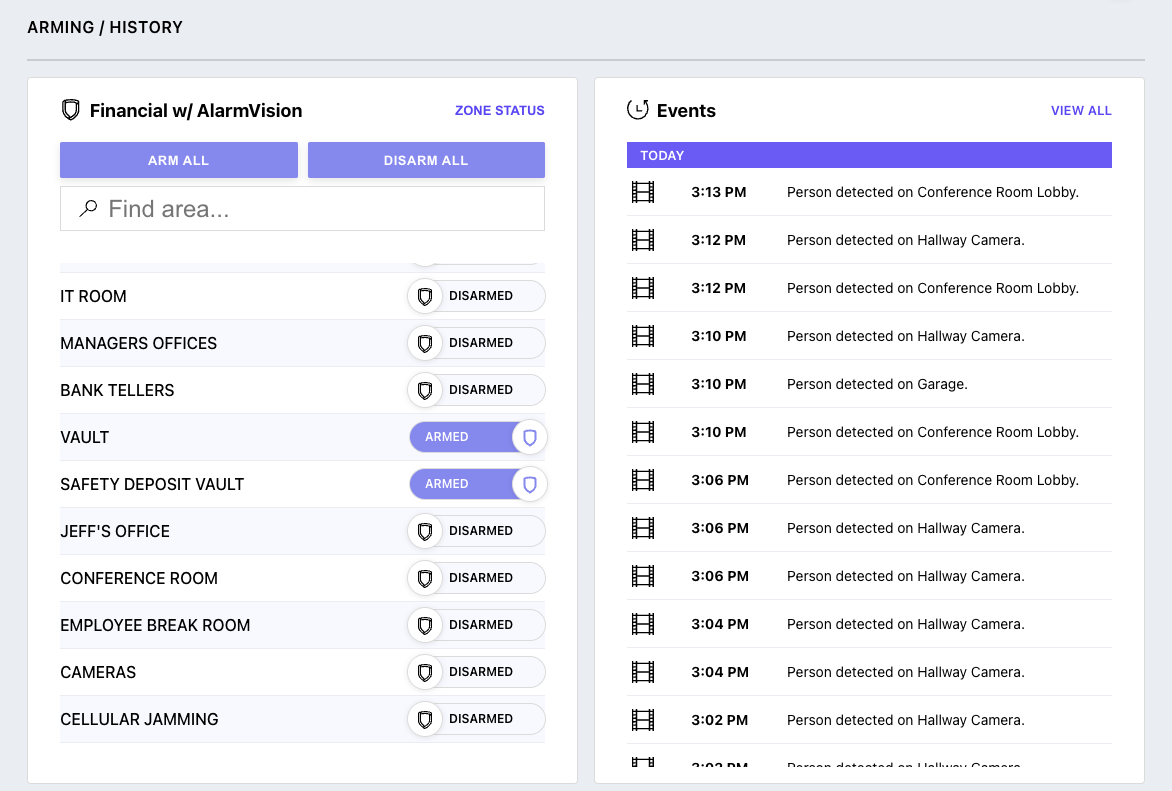
“One of the most important parts of any security environment is understanding the current operational state of the system.
Virtual Keypad allows customers to immediately identify whether areas are armed or disarmed, review recent activity, and quickly recognize conditions that may require attention.”
Demo Steps
-
Open the System Overview dashboard.
-
Review current system status.
-
Identify armed and disarmed areas.
-
Show recent activity or events.
-
Discuss operational awareness workflows.
Customer Value
-
immediate visibility
-
operational awareness
-
remote monitoring
-
simplified management
Key Talking Points
-
real-time system awareness
-
simplified operational visibility
-
centralized security management
-
remote operational control
Arming & Disarming
Presenter Talk Track
“Virtual Keypad allows authorized users to remotely arm or disarm their system from virtually anywhere.
For commercial environments, this helps managers, supervisors, and security personnel maintain security operations without needing to be physically onsite.”
Demo Steps
-
Open the System Overview dashboard.
-
Arm an area.
-
Disarm an area.
-
Demonstrate independent area control if configured.
-
Explain different arming workflows if available.
.png?cb=88cd159957becd3cce5376b0db48b5c1)
Customer Use Cases
-
after-hours arming
-
remote opening and closing
-
warehouse security
-
perimeter-only arming
-
multi-department operations
Customer Value
-
operational flexibility
-
remote management
-
simplified workflows
-
improved awareness
Key Talking Points
-
remote operational control
-
flexible area management
-
simplified daily operations
-
connected security workflows
Area Management
Presenter Talk Track
“Many commercial and high-security environments require different parts of the facility to operate independently.
Virtual Keypad allows customers to manage security based on how the environment is actually used.”
Demo Steps
-
Show multiple areas if configured.
-
Review different area states.
-
Arm one area while leaving another active.
-
Explain operational workflows.
.png?cb=87f97b23f6c95e4a084b832694134ab6)
Customer Use Cases
-
office and warehouse separation
-
server room protection
-
after-hours perimeter security
-
multi-tenant facilities
-
restricted environments
Customer Value
-
improved operational control
-
flexible security management
-
simplified oversight
-
better environmental segmentation
Zone Status & Fault Management
Presenter Talk Track
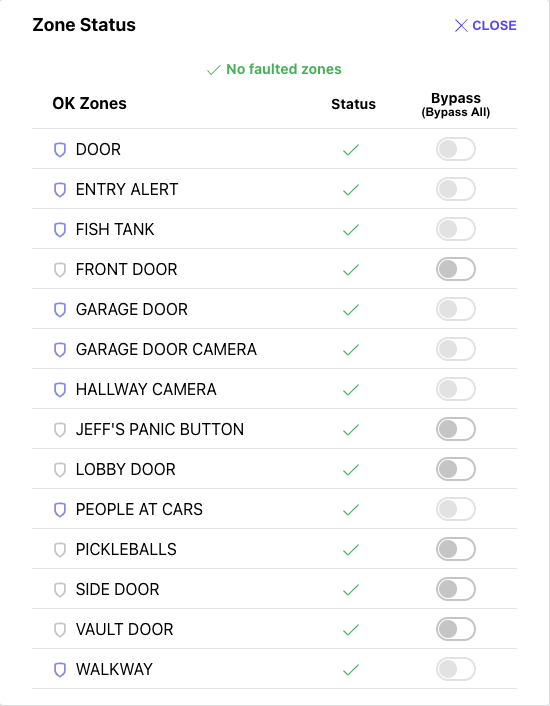
“Virtual Keypad helps customers quickly understand why a system may not be ready to arm by providing visibility into zone conditions and system activity.”
Demo Steps
-
Open Zone Status.
-
Review normal zones.
-
Show faulted or bypassed zones if available.
-
Demonstrate fault handling workflows.
-
Explain bypass functionality.
Key Talking Points
-
faster troubleshooting
-
reduced confusion
-
operational awareness
-
simplified user experience
Customer Value
-
faster issue resolution
-
reduced operational delays
-
easier system management
-
improved visibility
Alarm Handling
Presenter Talk Track
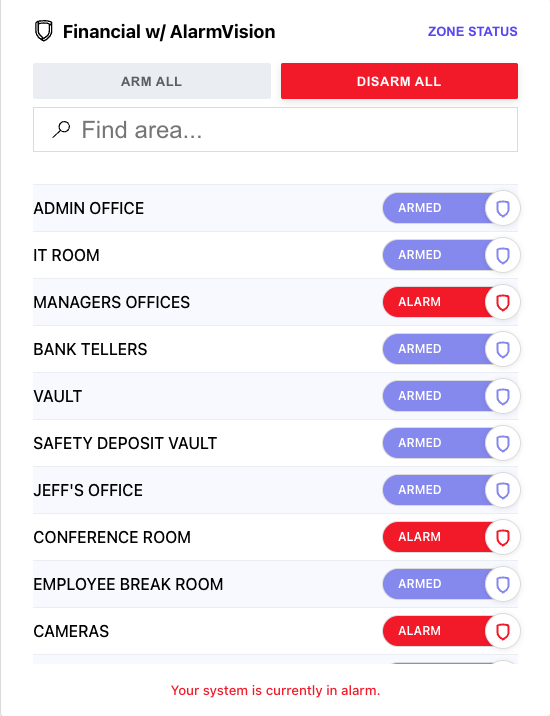
“When alarms occur, customers need fast access to meaningful information so they can quickly understand what happened and begin responding appropriately.
Virtual Keypad helps customers move from alarm notification into operational response workflows from a single platform.”
Demo Steps
-
Trigger or simulate an alarm if available.
-
Open alarm activity or notification.
-
Review event details.
-
Navigate into related workflows if configured.
-
Demonstrate acknowledgment or response workflows.
Customer Value
-
faster response
-
improved awareness
-
simplified alarm handling
-
reduced uncertainty
Key Talking Points
-
operational response
-
connected workflows
-
faster awareness
-
informed decision making
Alarm Verification Workflows
Presenter Talk Track
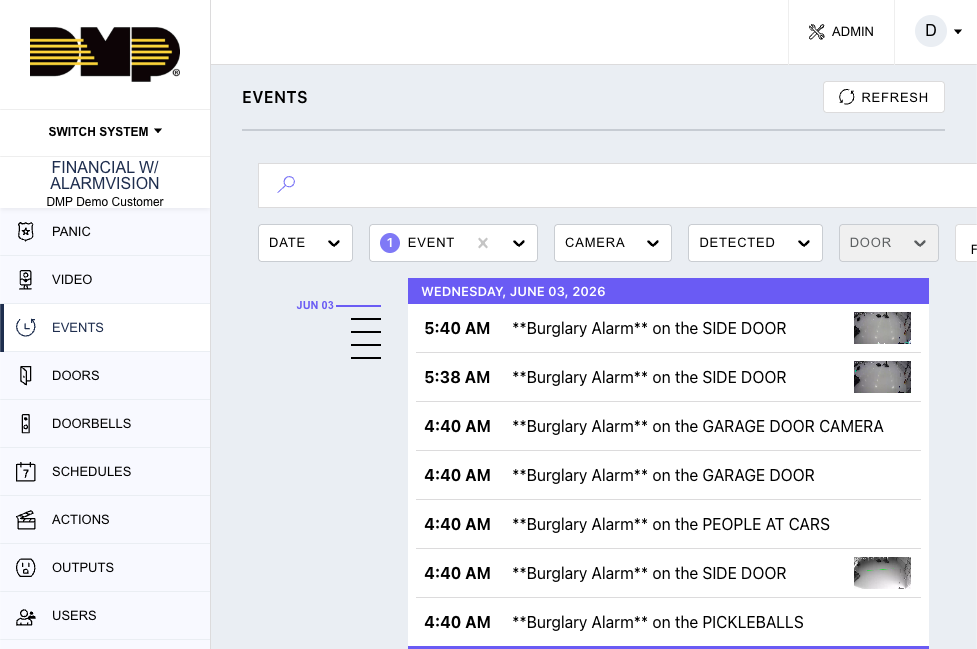
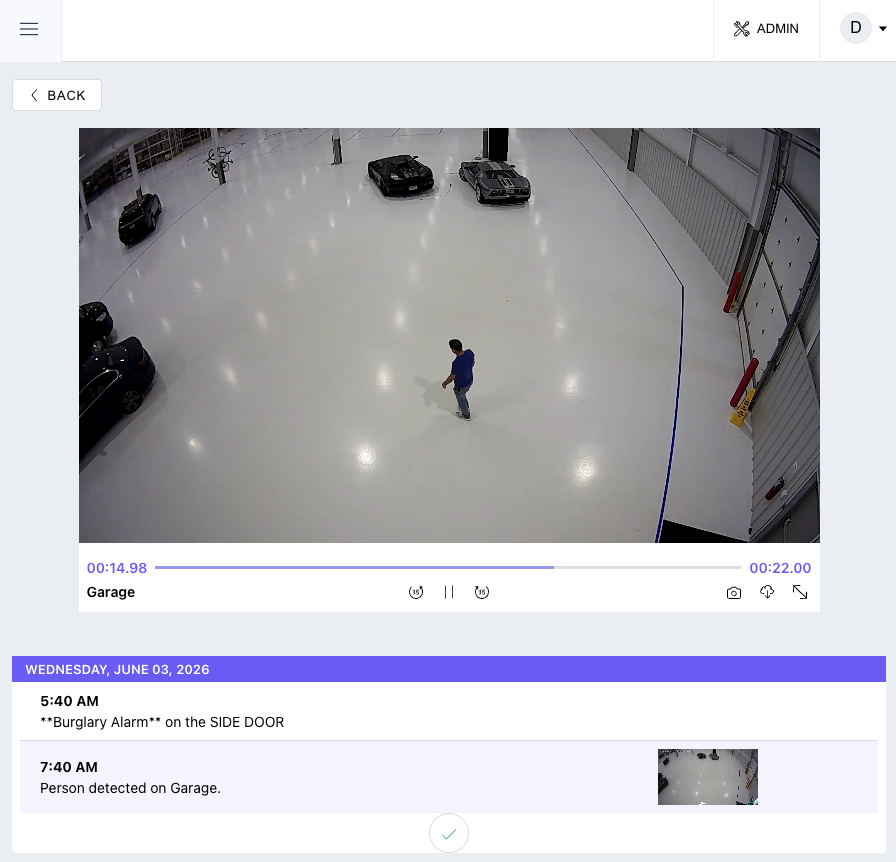
“One of the advantages of Virtual Keypad is that customers can move directly from an alarm event into verification workflows without changing applications.”
Demo Steps
-
Open a recent alarm event.
-
Review associated details.
-
If configured, open related video.
-
Demonstrate verification workflow.
-
Discuss informed response decisions.
Customer Value
-
improved awareness
-
faster response
-
operational confidence
-
simplified investigations
DMP Positioning Guidance
Position as:
-
improved operational awareness
-
enhanced verification workflows
-
unified event response
-
simplified alarm handling
Avoid positioning as:
-
guaranteed false dispatch elimination
-
autonomous security response
-
AI replacement for operators
-
fully automated alarm decision making
Events & Security Activity
Presenter Talk Track
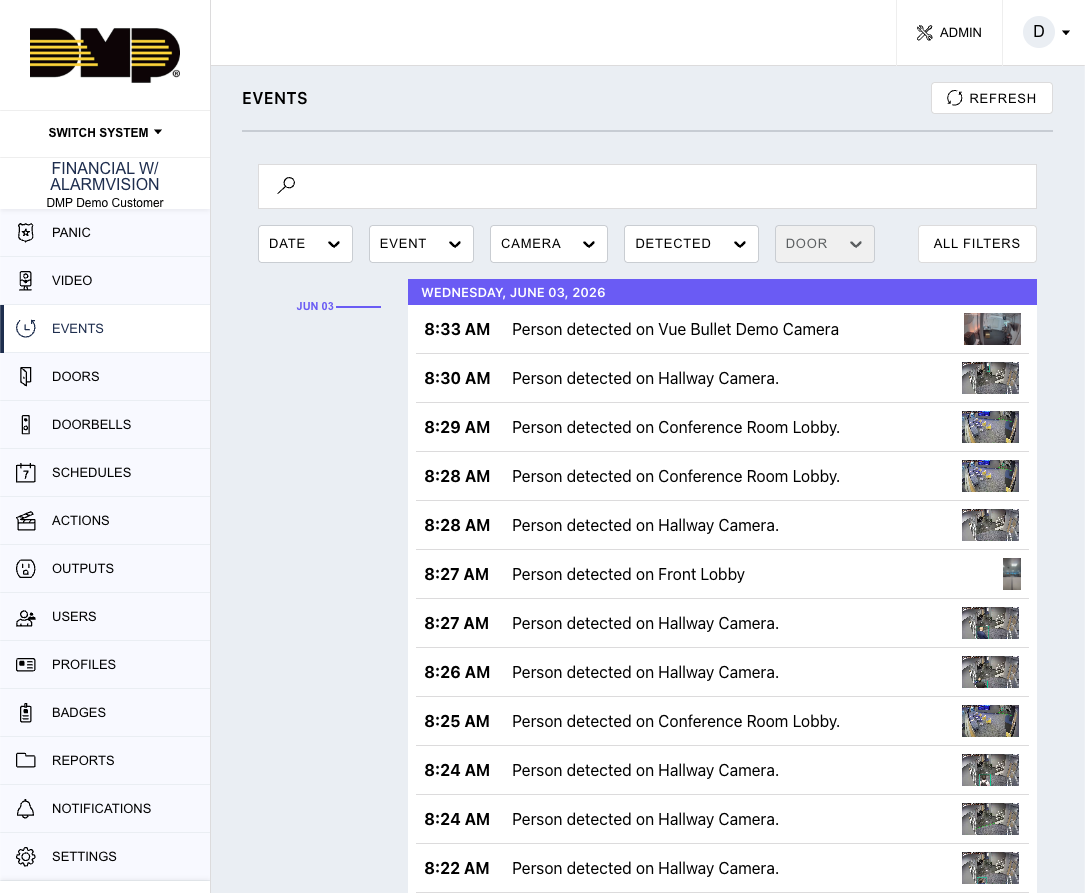
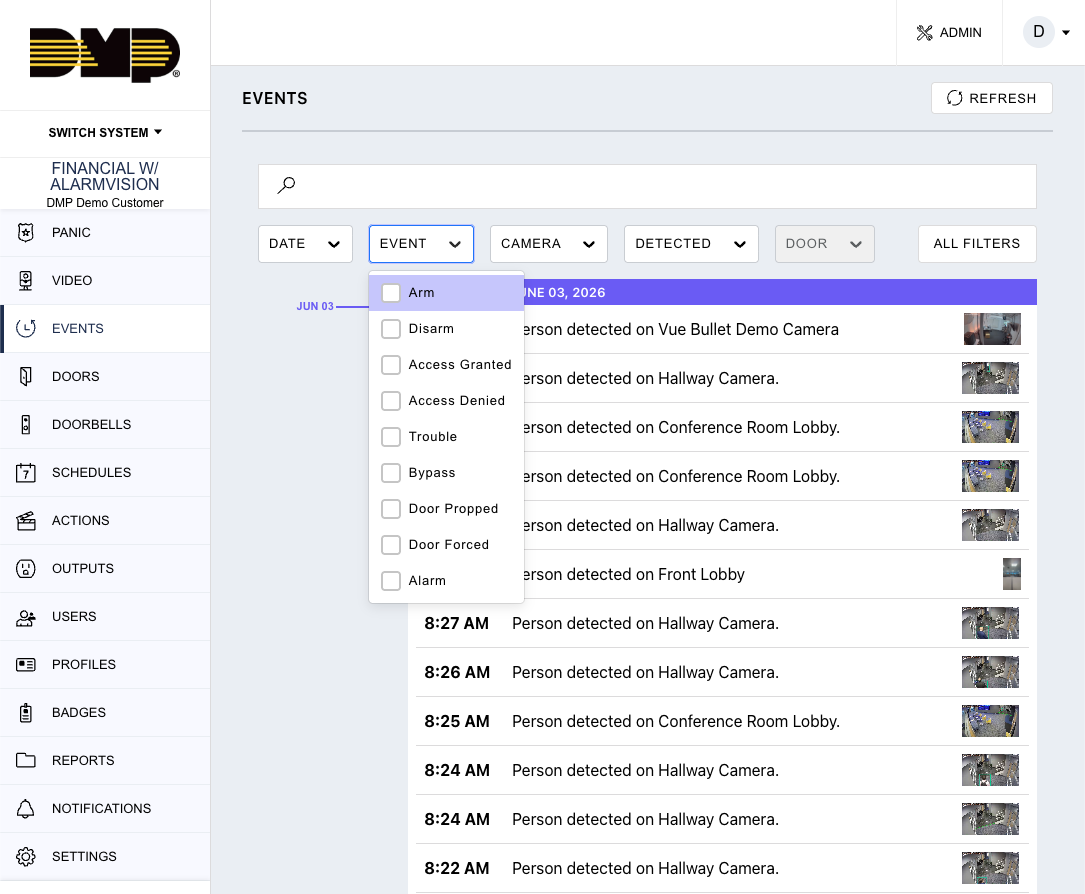
“The Events page allows customers to quickly review system activity and understand what occurred across the environment.”
Demo Steps
-
Open Events.
-
Filter intrusion-related activity.
-
Review arm/disarm history.
-
Review alarms and troubles.
-
Show event details.
Key Talking Points
-
searchable activity history
-
operational accountability
-
simplified investigations
-
centralized awareness
Customer Value
-
easier investigations
-
faster awareness
-
improved accountability
-
operational visibility
Notifications & Operational Awareness
Presenter Talk Track
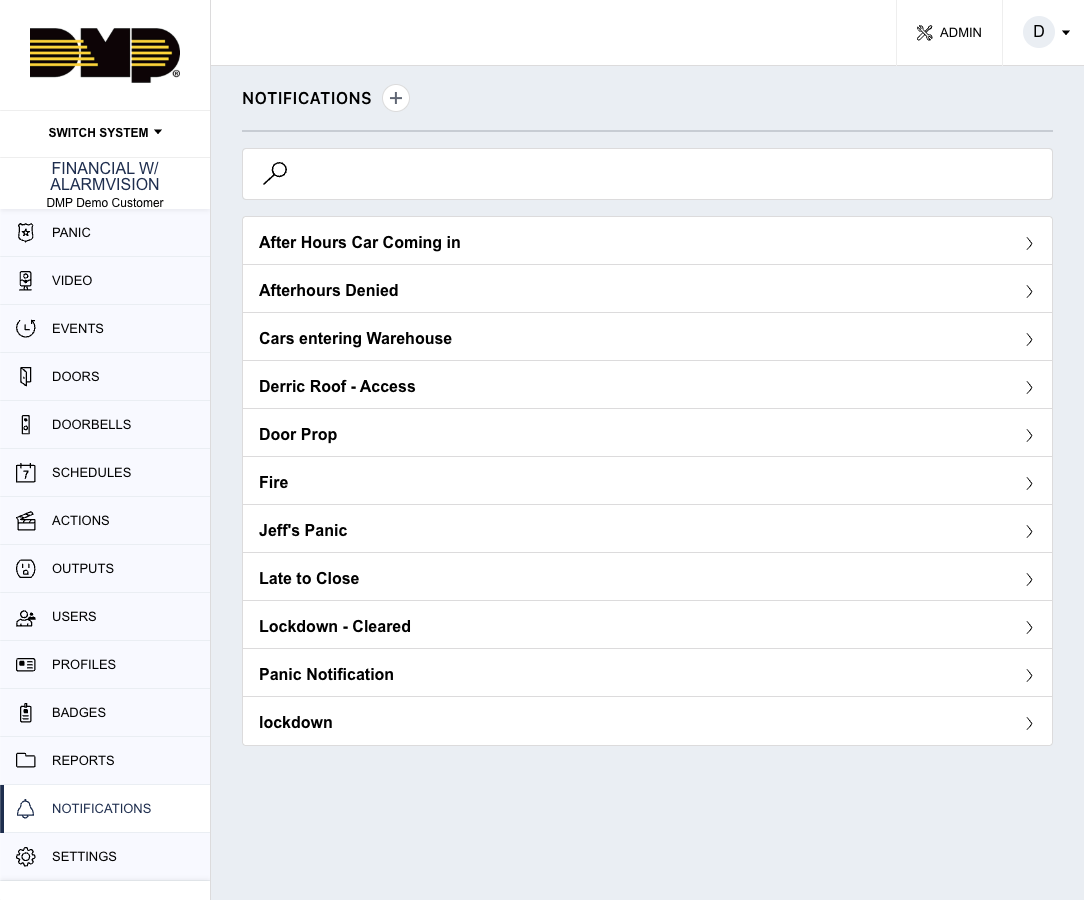
“Customers can receive notifications for important security activity even when they are not actively logged into Virtual Keypad.”
Demo Steps
-
Open notification settings.
-
Review available security event categories.
-
Demonstrate configurable notifications.
-
Explain available notification methods if configured.
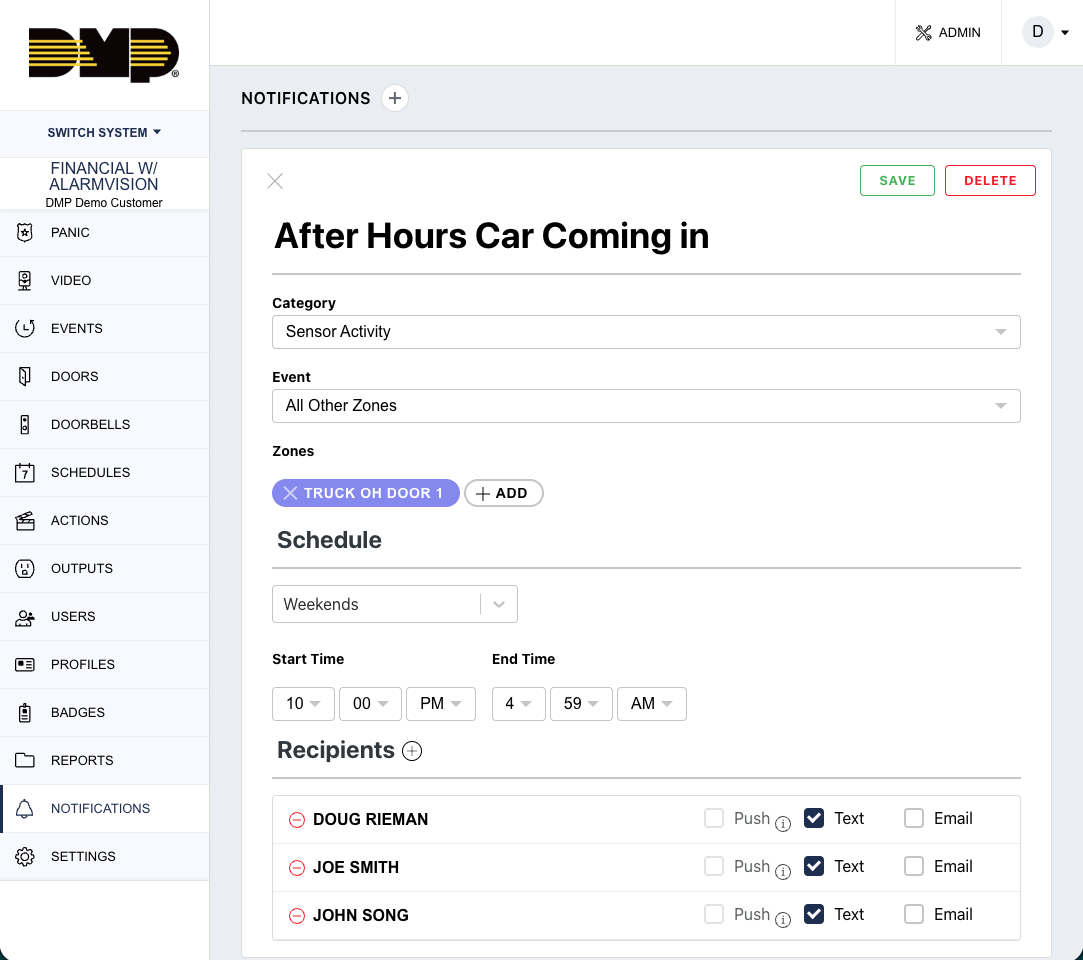
Examples
-
alarms
-
arming activity
-
disarming activity
-
troubles
-
bypass events
-
opening and closing activity
Customer Value
-
remote awareness
-
operational visibility
-
informed response
-
faster communication
Integrated Security Workflows
Presenter Talk Track
“One of the biggest differentiators of Virtual Keypad is that security management operates as part of a connected operational platform.
Security workflows can integrate directly with:
-
video
-
access control
-
automation
-
notifications
-
operational response workflows”
Security + Video
-
alarm verification
-
event-linked video
-
visual awareness
-
informed response
Security + Access Control
-
restricted area protection
-
lockdown workflows
-
credential activity awareness
-
secured operational environments
Security + Automation
-
lighting response
-
deterrence workflows
-
scheduled security operations
-
automated environmental actions
Security + Notifications
-
actionable alerts
-
escalation workflows
-
remote operational awareness
Key Security Management Themes
The following themes should be consistently reinforced throughout this section and throughout customer conversations:
Operational Awareness
Customers maintain visibility into important system activity and environmental conditions.
Unified Security
Security workflows integrate with access control, video, automation, and notifications.
Simplified Management
Customers can manage complex environments from a single platform.
Informed Response
Customers gain operational context before responding to events.
Flexible Deployment
The platform supports:
-
single-site systems
-
enterprise operations
-
high-security environments
-
distributed organizations
-
multi-site deployments
Important Competitive Positioning Guidance
Position As
-
unified security management
-
operational awareness
-
connected workflows
-
simplified alarm handling
-
enhanced verification
-
remote operational control
Avoid Positioning As
-
autonomous security replacement
-
AI-driven security platform
-
guaranteed false dispatch elimination
-
military-grade autonomous response platform
Key Message
Virtual Keypad transforms security management into a connected operational workflow that combines awareness, visibility, notifications, verification, and response from a single unified platform.